I use MediaMonkey to add tags to song metadata instead of making playlists. Playlists typically use links to the locations of songs, which means if you move computers or shuffle your files about, the links break. Adding tags to the .mp3 metadata permanently adds this information to the track itself, fixing this problem.
Tools > Options > Library: Fields
If you would like to set up your collection identical to mine (for example, if you have reason to anticipate inheriting my songfiles), use
Custom 7 and type in 'Fenvibes'
I use the tag format:
fen0topic
So I can search 'fen0' for a list of all songs
Not all songs get a tag - some albums are more mood music and don't have a specific theme. Some songs get two tags, separated with a semicolon
Mixtapes
You can automatically create a playlist using tags in MediaMonkey, but here is a technique for turning your tagged songs into shareable mixtapes quickly.
Choose 'All Tracks' in the left-hand panel, and click the Filter symbol. Filter by Fenvibes, and type in either the tag or known/unknown as preferred
Then, Ctrl+A to select all tracks, and Ctrl+C to copy. Open a folder in File Explorer and paste. You will see copies of every song file newly saved.
Ensure you copy, not anything else, or it will remove the songs from your original files
In the left-hand panel you can now go to Folders > use the file explorer to navigate to the folder you copied the songs to. Edit the Album name, change Album Artist to 'none' or 'Various Artists', add a cover and so on. Zip & share the folder.
Archival process
My semi-regular practice for keeping the radio station archived & safe from data-loss is:
Move all new music to primary hard drive
Run powershell code to get Album List
Update Mediamonkey Library
Optionally, add music to music player, using Mediamonkey and a cable
Run Mediamonkey report to get Fenvibes list
Back up to 2nd hard drive
Optionally, upload new data to website
The use of two hard drives protects each from data failure. In case of a catastrophe, there is a written list of albums & tags that I could reconstruct manually - this list is kept on hard drives, computer, and my website.
Program Code
I keep each album in a folder, and use Windows PowerShell to automate looking through every folder of folders for just album names, and then putting them into a text file
Open PowerShell and use this code, remembering to change the path urls from generic ones
There may be a better way to export this list into HTML, but I do it manually using regex
/\n/g
Adding a HTML list element around each, with a \n between, and then pasting into a HTML document.
Radio Astercote Tag List
I produce a list of all currently tagged songs as a backup - text files are small, and protect against data loss or corruption
Open MediaMonkey
Open a view with all tracks in it - All Tracks
Click filter
Fenvibes: is known
Press enter to display all songs with a fenvibe
Ctrl+A to select all songs in view
File > Reports > File List
Sorting - change to Fenvibes
Columns - leave as is for now, it's sufficient
This list exports to pretty janky HTML but it's fine for the purpose of emergencies and sharing
MP3 player and Speakers
The cheapest way to get good MP3 players and home speakers is using forgotten technology.
Old smartphones which no longer run modern apps - basically essential to participate in life, making them worthless as smartphones - may still work and have huge amounts of storage. Mine was £20 on Gumtree, has a cracked screen and over 100GB of space. I use the app Musicolet.
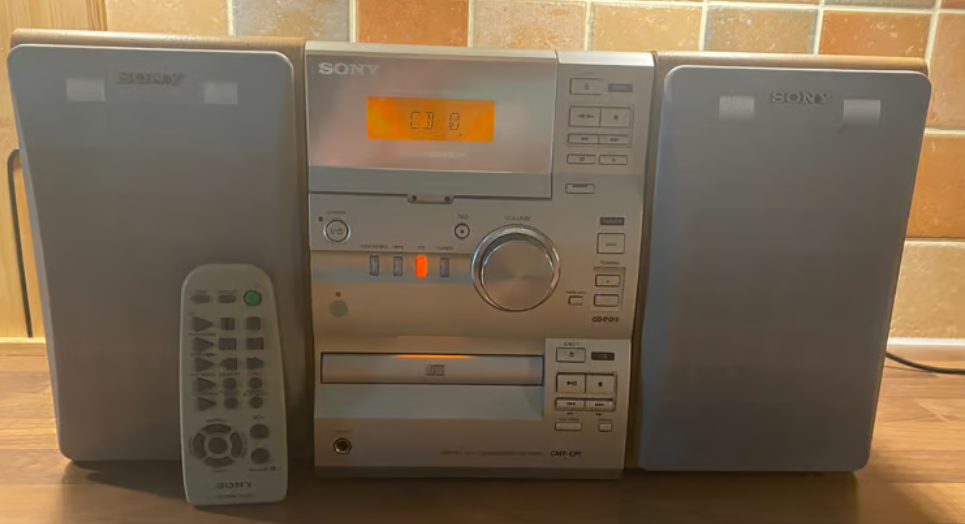
Old hi fis are large and boxy, and can also be picked up for cheap - especially if they aren't 'retro attractive'. Most will have an 'AUX input' port. Then all you need is a 3.5mm cable to connect your mp3 player or laptop to the speakers.
Again, these speakers can be got disproportionately cheap 2nd hand for their quality - compared to the cost of a modern speaker set or portable plug-in speakers. Mine are from the 00s and still going strong, and much nicer than laptop sound. You can pick this sort of thing up for around £30, or your friends and family may just have one kicking about in storage.
An old hi fi system - the bottom left corner has a little AUX input jack!